ติดตามสินค้าขอเข้าคลังของคุณ
บนแอป SASOM
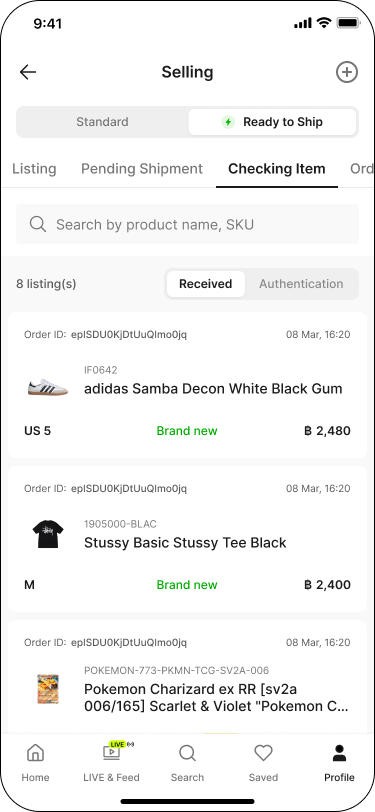
ขั้นตอนที่ 1: ตรวจสอบสินค้าที่ได้รับแล้ว
คุณสามารถตรวจสอบรายการสินค้าที่จัดส่งมาถึงคลังสินค้าได้ ตามขั้นตอนดังนี้
ไปที่แท็บ 'โปรไฟล์' (Profile) จากนั้นในส่วน 'รายการขาย' (Selling) แตะที่สถานะ 'กำลังตรวจสอบ' (Processing)
สลับแท็บเป็น 'พร้อมจัดส่ง' (Ready to Ship) จากนั้นไปที่แท็บ 'กำลังตรวจสอบสินค้า' (Checking Item)
แตะแท็บย่อย 'จัดส่งสำเร็จ' (Received)
รายการสินค้าที่มาถึงคลังสินค้าแล้วจะแสดงในรายการด้านล่าง
ขั้นตอนที่ 2: ติดตามสินค้าที่ตรวจสอบสำเร็จ
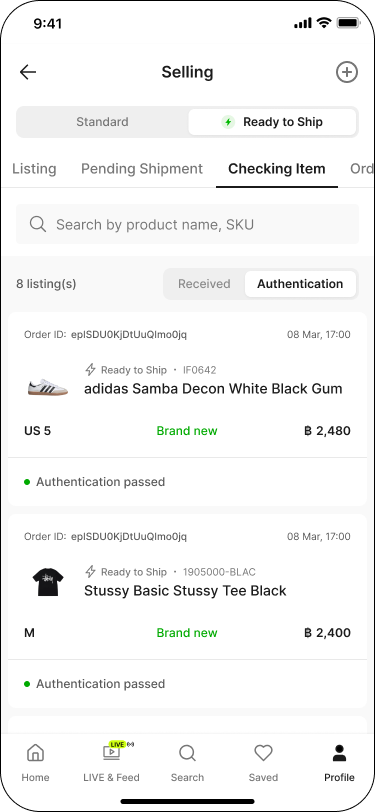
สินค้าที่ได้รับแล้วจะเข้าสู่กระบวนการการตรวจสอบ คุณสามารถดูรายการสินค้าที่ผ่านการตรวจสอบได้ตามขั้นตอนดังนี้
ไปที่แท็บ 'โปรไฟล์' (Profile) จากนั้นในส่วน 'รายการขาย' (Selling) แตะที่สถานะ 'กำลังตรวจสอบ' (Processing)
สลับแท็บเป็น 'พร้อมจัดส่ง' (Ready to Ship) จากนั้นไปที่แท็บ 'กำลังตรวจสอบสินค้า' (Checking Item)
แตะแท็บย่อย 'ตรวจสอบสินค้า' (Authentication) สินค้าที่ผ่านการตรวจสอบจะแสดงสถานะ 'สินค้าผ่านการตรวจสอบ' (Authentication passed)
หมายเหตุ:
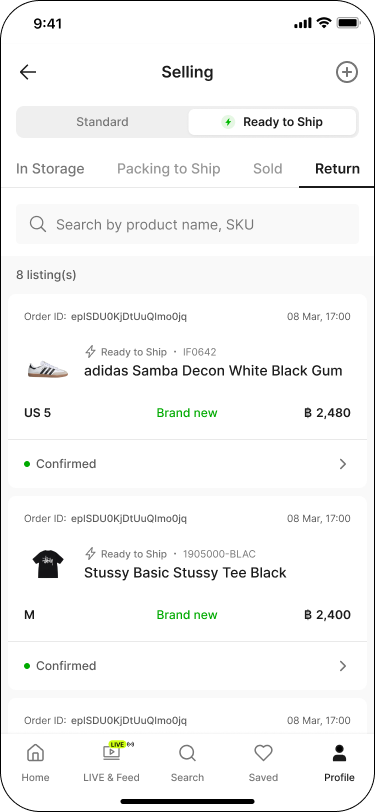
✳ สินค้าที่ไม่ผ่านมาตรฐานการตรวจสอบจะถูกยกเลิกอัตโนมัติและส่งคืนให้คุณ
✳ คุณสามารถติดตามสินค้าที่ส่งคืนได้ โดยไปที่แท็บ 'คืนสินค้า' (Return)
ขั้นตอนที่ 3: ตรวจสอบสินค้าที่อยู่ในคลัง
เมื่อสินค้าของคุณผ่านการตรวจสอบแล้วจะถูกจัดเก็บในคลังสินค้า คุณสามารถดูรายละเอียดของสินค้าและระยะเวลาที่อยู่ในคลังได้ตามขั้นตอนนี้:
ไปที่แท็บ 'โปรไฟล์' (Profile) จากนั้นในส่วน 'รายการขาย' (Selling) แตะที่สถานะ 'รายการสินค้า' (Listing)
สลับแท็บเป็น 'พร้อมจัดส่ง' (Ready to Ship) จากนั้นไปที่แท็บ 'อยู่ในคลัง' (In Storage)
คลิกเลือกที่สินค้าแต่ละรายการ เพื่อดูรายละเอียด
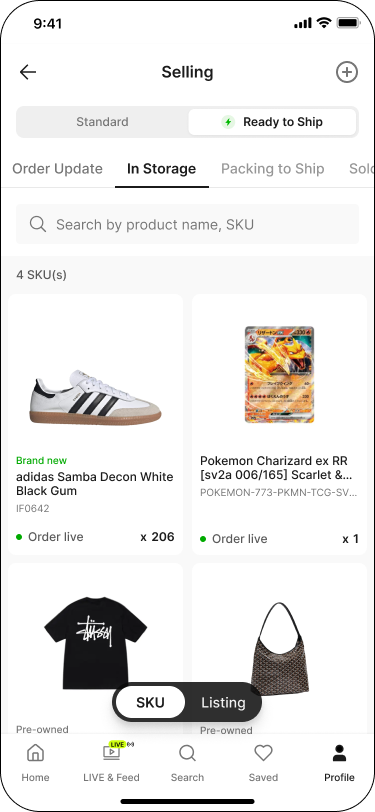
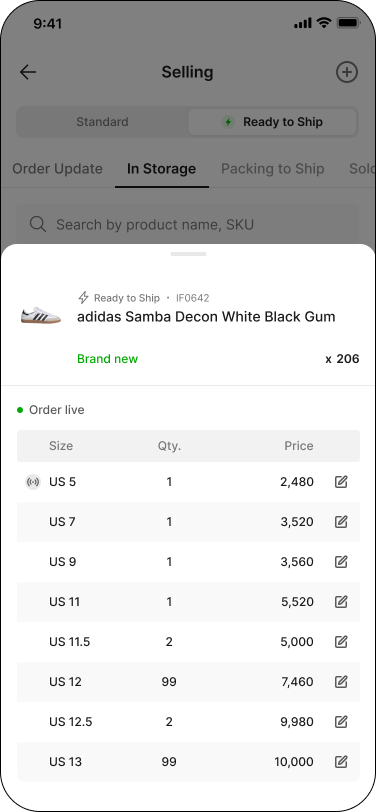
🎉 ยินดีด้วย! สินค้าของคุณถูกตั้งขายบนแพลตฟอร์ม SASOM แล้ว คุณสามารถดูรายละเอียดและจัดการรายการของคุณได้ที่แท็บ 'อยู่ในคลัง' (In Storage) นี้เลย
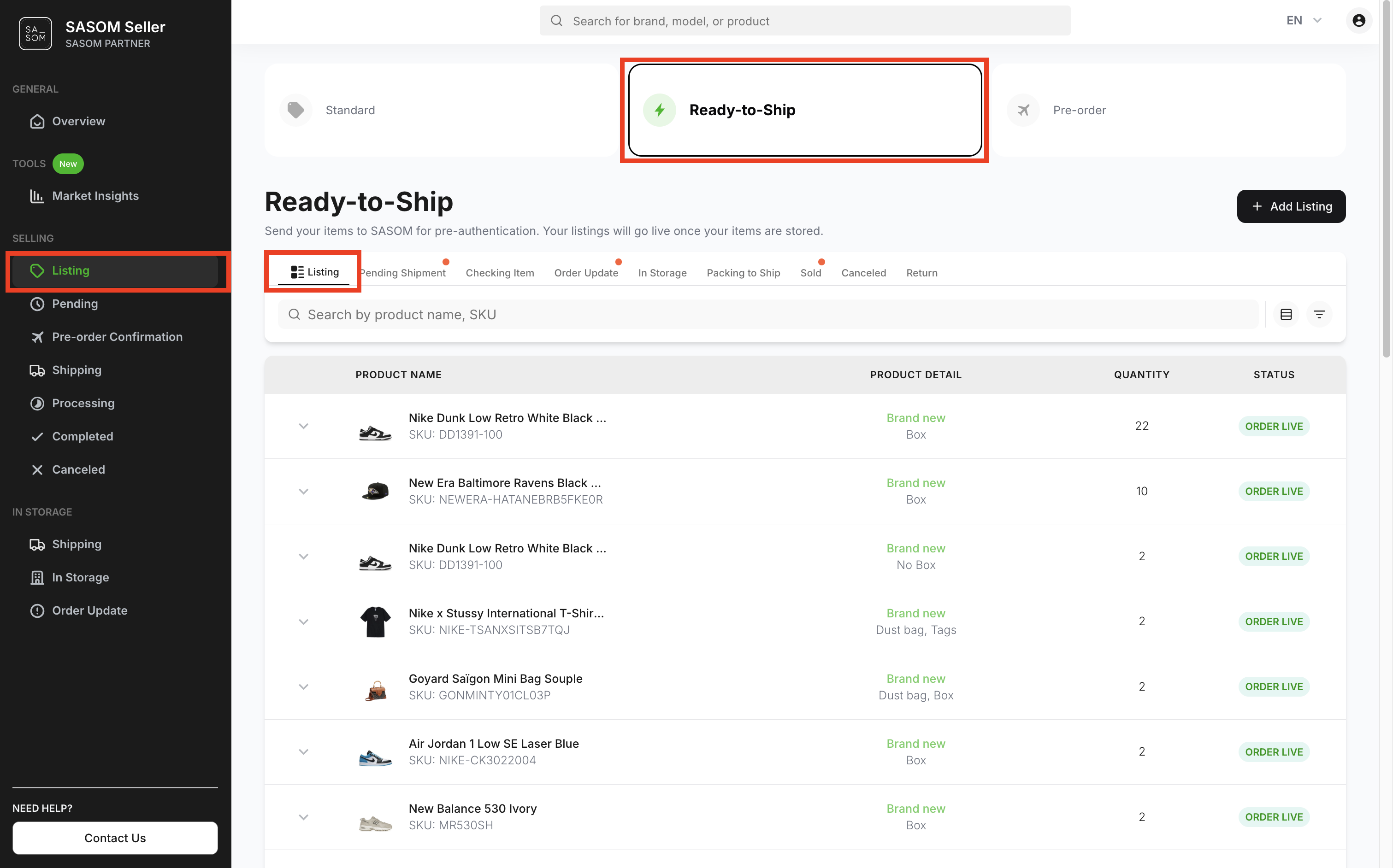
บน SASOM Seller Center
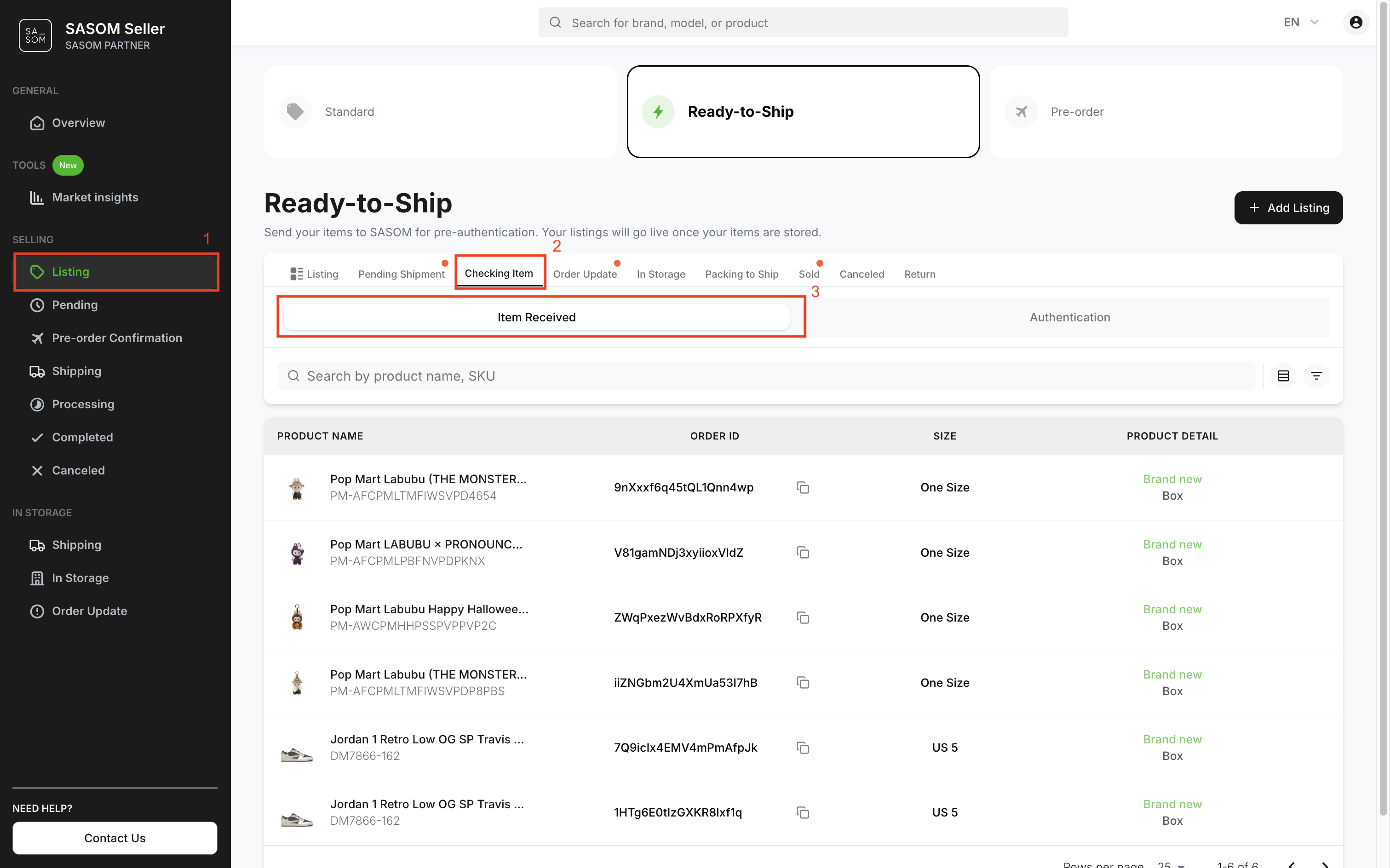
ขั้นตอนที่ 1: ตรวจสอบสินค้าที่ได้รับแล้ว
คุณจะสามารถตรวจสอบรายการสินค้าที่จัดส่งมาถึงคลังสินค้าได้ ตามขั้นตอนดังนี้:
- ไปที่เมนู 'รายการสินค้า' (Listing)
- เลือกเมนู 'พร้อมจัดส่ง' (Ready-to-Ship) และแท็บ'กำลังตรวจสอบสินค้า' (Checking Item)
- เลือกแท็บย่อย 'จัดส่งสำเร็จ' (Item Received)
- รายการสินค้าที่มาถึงคลังสินค้าแล้วจะแสดงในตารางด้านล่าง
ขั้นตอนที่ 2: ติดตามสินค้าที่ตรวจสอบสำเร็จ
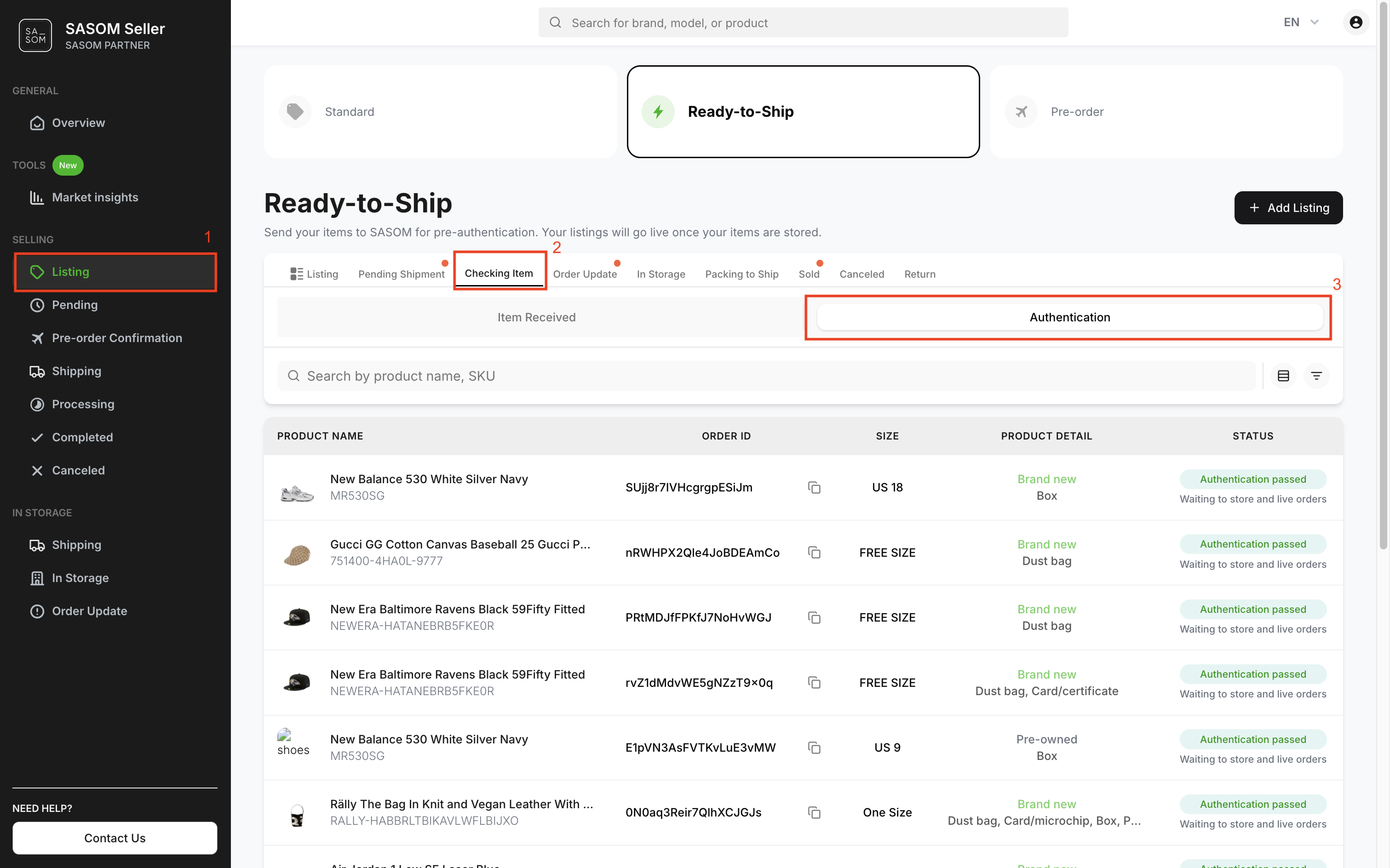
สินค้าที่ได้รับแล้วจะเข้าสู่กระบวนการการตรวจสอบ คุณสามารถดูรายการสินค้าที่ผ่านการตรวจสอบได้ตามขั้นตอนดังนี้:
- ไปที่เมนู 'รายการสินค้า' (Listing)
- เลือกเมนู 'พร้อมจัดส่ง' (Ready-to-Ship) และแท็บ 'กำลังตรวจสอบสินค้า' (Checking Item)
- เลือกแท็บย่อย 'ตรวจสอบสินค้า' (Authentication)
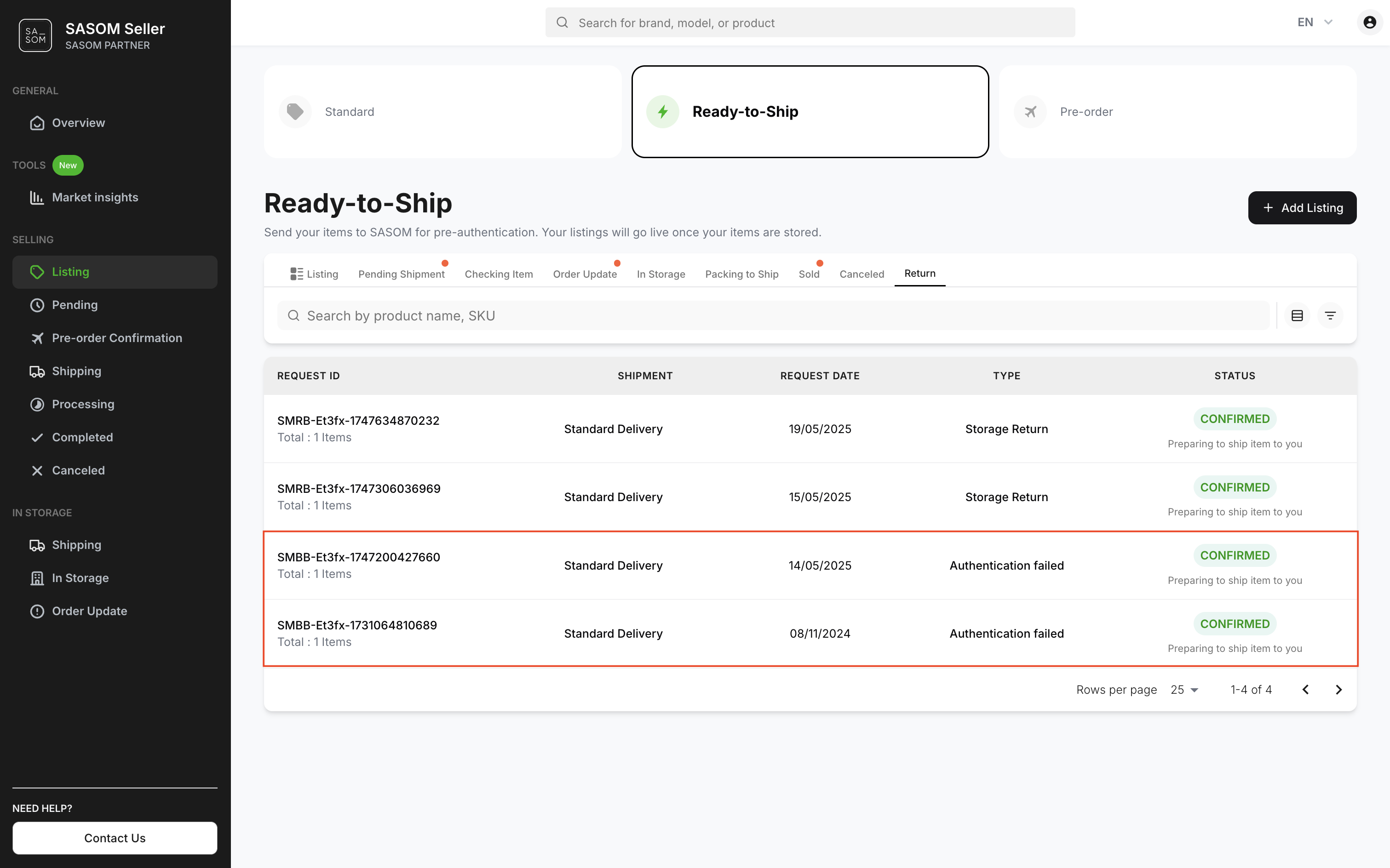
หมายเหตุ:
✳ สินค้าที่ไม่ผ่านมาตรฐานการตรวจสอบจะถูกยกเลิกอัตโนมัติและส่งคืนให้คุณ
✳ คุณสามารถติดตามสินค้าที่ส่งคืนได้ โดยไปที่แท็บ 'คืนสินค้า' (Return) และเลือกดูรายการ สินค้าไม่ผ่านการตรวจสอบ (Authentication Failed)
ขั้นตอนที่ 3: ตรวจสอบสินค้าที่อยู่ในคลัง
เมื่อสินค้าของคุณผ่านการตรวจสอบแล้วจะถูกจัดเก็บในคลังสินค้า คุณสามารถดูรายละเอียดของสินค้าและระยะเวลาที่อยู่ในคลังได้ตามขั้นตอนนี้:
- ไปที่เมนู 'รายการสินค้า' (Listing)
- เลือกเมนู 'พร้อมจัดส่ง' (Ready-to-Ship)
- เลือกแท็บ 'อยู่ในคลัง' (In Storage)
- คลิกเลือกที่สินค้าแต่ละรายการ เพื่อดูรายละเอียด
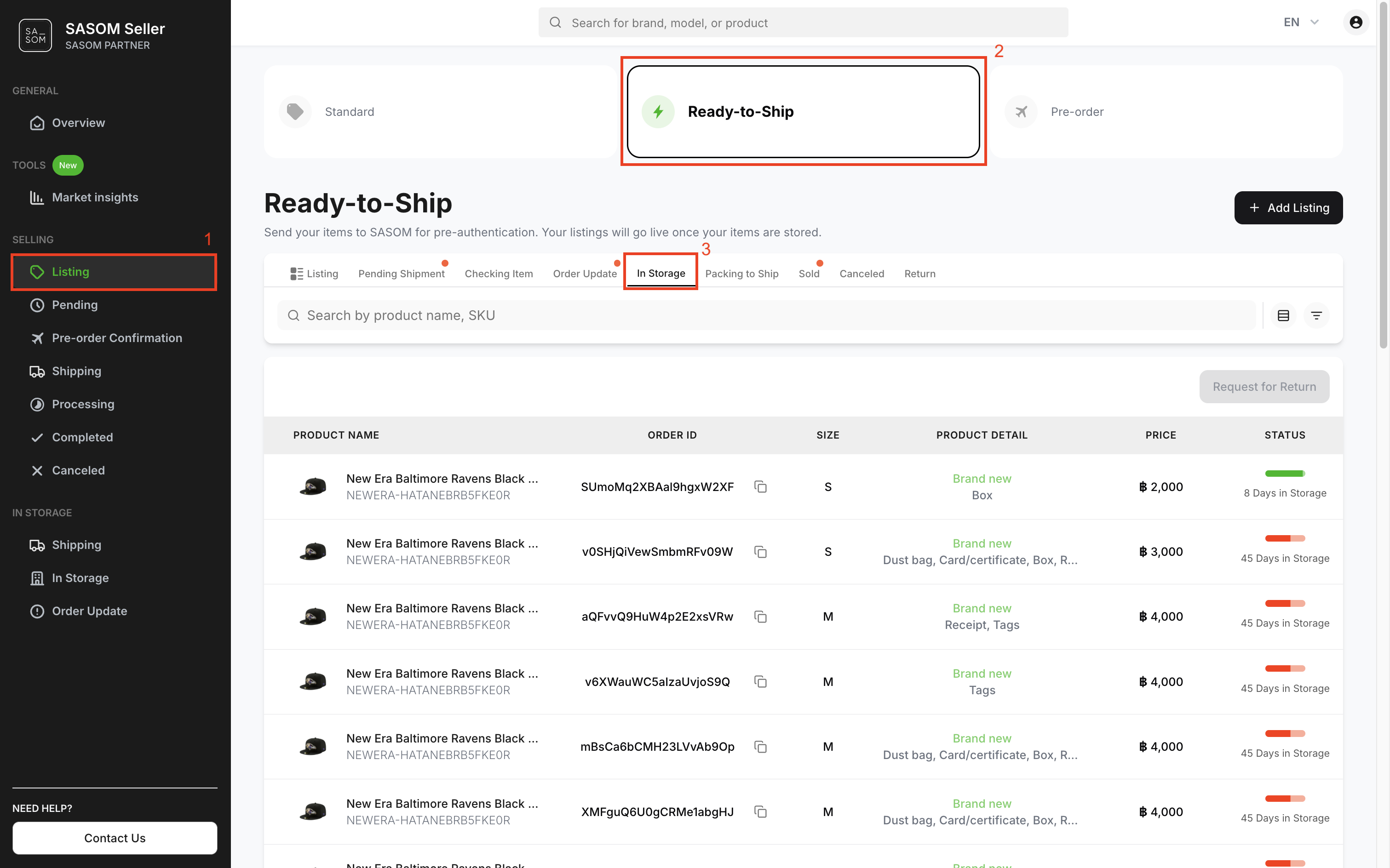
🎉 ยินดีด้วย! สินค้าของคุณถูกตั้งขายบนแพลตฟอร์ม SASOM แล้ว คุณสามารถดูรายละเอียดและจัดการรายการตั้งขายของคุณได้ที่เมนู'รายการสินค้า' (Listing) และเลือกแท็บ 'พร้อมจัดส่ง' (Ready-to-Ship)